Growth
Event tracking plan: the events to track before you trust any funnel number
An event tracking plan template: the 10 to 20 events to track, how to name them, where each should fire, and five checks before you trust a funnel number.

· 10 min read
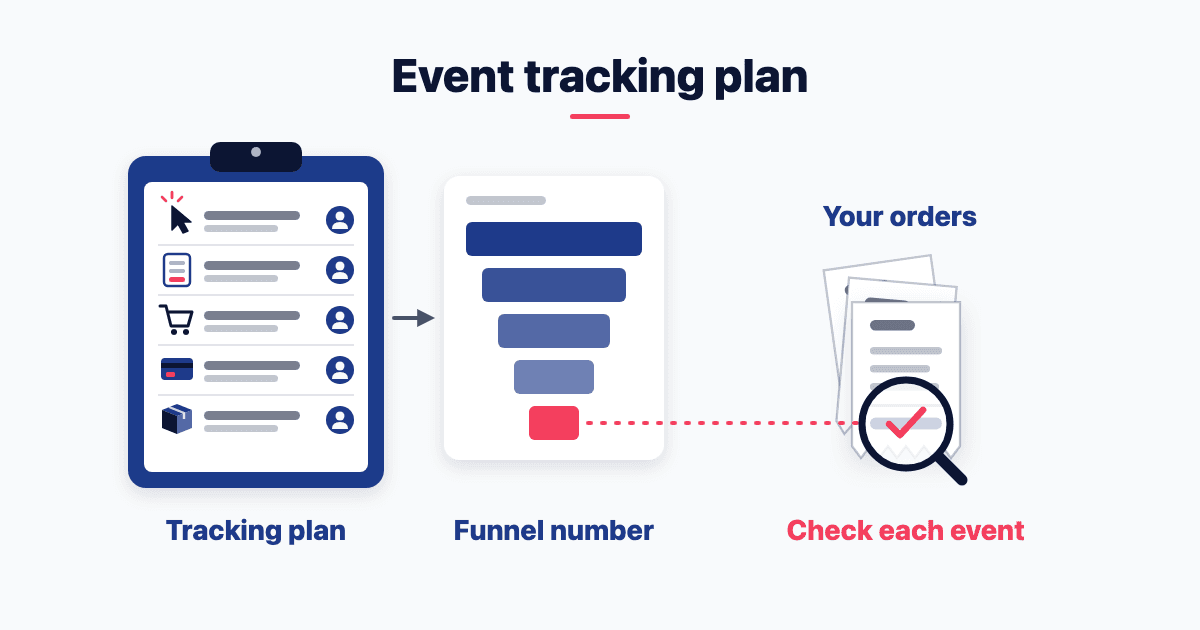
A funnel number is only as true as the events underneath it. An event tracking plan is a short spec of the 10 to 20 actions that matter. It gives each one's name, where it fires, what it carries and who owns it. Write it before the dashboard. Then check each event against your orders or sales records before you trust the number.
A plan also finds what's already broken. At OurBus Charters, a US coach-hire client, the result reads: "A clean event taxonomy in PostHog; two live data bugs found and fixed." The case study's funnel figures come from the client's PostHog project, de-duplicated.
If your analytics, your ad platform and your sales records disagree about last week, start here.
What goes in an event tracking plan?
A tracking plan "is a document that acts as a source of truth for your event data", in Amplitude's tracking plan guide. Give every event a row with eight fields:
Event name. One name, written one way.
Trigger. The exact moment it fires: "after the server saves the lead", not "on button click".
Where it fires. Browser, app or server.
Properties. Each with its type and allowed values.
Destinations. Every tool it goes to, and that tool's name for it.
What it feeds. The decision or funnel number, and who reads it.
Owner. One named person.
Status. Planned, live, verified on a date, or retired.
Here's one filled row, as an illustration:
Event:
lead_submitted, fired on the server once the lead is saved.Properties:
lead_id,form_name,source,campaign.Destinations: Google Analytics 4 (GA4) as
generate_lead, Meta asLeadwith anevent_id, and your customer relationship management (CRM) system.Feeds: cost per lead by channel. Owner: the growth lead.
Which events should you track first?
Start from decisions, not screens. Segment's guide to creating a tracking plan says "it's best to start with the key metrics that drive value for your business". So list the three to five decisions your numbers must support: where to spend, which step leaks, who pays. An event that feeds no decision stays out.
Use the platform's own names where they exist. Google says "You should send recommended events with their prescribed parameters" (Google's recommended events). Its generate_lead fires when a user "submits a form or a request for information". Don't rebuild what it already collects, such as page_view, first_visit and session_start (Google's automatically collected events).
Starter plan A: a lead-gen or quote business (10 events; illustrative):
Automatic on the web:
page_view,form_start.Browser:
chat_clickedfor a chat or WhatsApp button, andcall_clicked.Server, once the lead is saved:
lead_submitted.From the CRM:
lead_qualified,meeting_booked,quote_sent,deal_wonwith value and currency, anddeal_lostwith a reason.
Once lead_qualified is reliable, send the qualified stage back to your ad platforms.
Starter plan B: an app or subscription product (12 events; illustrative):
Automatic in apps:
first_open.Server:
sign_up,trial_started,purchaseorsubscription_started(withtransaction_id, value and currency),subscription_renewed,subscription_cancelledandrefund.App:
login, oneonboarding_completed(not one per screen), your first-value action such aslesson_completed,paywall_viewedandinvite_sent.
At Iqra, a Baccalaureate exam-prep edtech in Morocco, the work ran in one order: "Instrument, personalise, then structure the curriculum." The plan came before the experiments. The same order runs through my edtech marketing strategy guide.
Variations are properties, not new events. PostHog's best practices say names should be "never generated dynamically". Its bad example, page_viewed_${pageName}, creates "thousands of unique event definitions". Mixpanel's tracking strategy guide says teams do best when they "limit their schema to a manageable set of core events".
How should you name events and properties?
Segment, Mixpanel and PostHog all pair an object with an action. They disagree on the rest:
Segment: Title Case, past tense, so "your event reads Product Viewed or Application Installed" (Twilio Segment's naming guide).
Mixpanel: "use snake_case for all event names, properties, and property values", as in
checkout_completed.PostHog: lowercase snake case, plus "Use present-tense verbs" and "the category:object_action framework".
Google Analytics adds hard rules. "Event names are case sensitive." And: "Event names must start with a letter. Use only letters, numbers, and underscores. Don't use spaces." Some names, such as form_submit, are reserved (Google's event naming rules).
Segment settles it: "the most important thing to do is to pick a single naming framework and stick with it". My reading: if GA4 is a destination, pick snake_case with no colons. Segment's examples have spaces, PostHog's format has a colon, and Google's rule allows neither.
Then map one action to each destination's name. Take my IIT Kanpur session sheet on wiring a lead form from 27 September 2026 (free Google sign-in). Its thank-you page fires "the Meta Pixel standard event Lead and a GA4 event 'lead_form_submit'". The chat button fires "fbq('trackCustom','WhatsAppClick') and a GA4 event 'whatsapp_click'". One action, two names. The plan records both.
Properties need fixed names too. PostHog suggests is_ or has_ prefixes for true-or-false values, and a _date or _timestamp ending for dates. In Google Analytics, you register a custom parameter as a custom dimension to report on it. "After 24-48 hours, you can start to report on" it (Google's custom dimensions help).
Where should each event fire: browser, app or server?
Put money and accounts on the server, and journeys and clicks in the browser. PostHog rates backend tracking as more reliable than browser tracking, partly because many people block tracking in their browsers. Use the backend if "You need accurate data".
Amplitude's guide makes Project Created a server-side event: the server step can fail even after the user has done everything right.
Blockers also hide events while you test. My session sheet warns: "Test with an ad blocker OFF, or the Pixel event won't show in Events Manager → Test Events."
Sending one event from the browser and the server, through the Meta Pixel and the Conversions API? Give both copies the same ID. Meta's rule: "a Meta Pixel’s eventID must match the Conversion API’s event_id" (Meta's de-duplication guide). The event names must match too. Matching works only "within 48 hours". Its fallback method "Does not deduplicate events when only using one event source". So fix a browser tag that fires twice; don't expect Meta to.
Consent changes what arrives. With consent mode, "Google fills the data collection gaps with conversion modeling and behavioral modeling" (Google's consent mode help). So Google Analytics will never match your order system exactly, by design.
Five checks before you trust a funnel number
The event list is half the job. Run these five checks on every event that carries money.
Fire it yourself and watch it arrive once. DebugView "displays the events and user properties that Analytics collects from a user in real time" (Google's DebugView help). Events stay hidden "if you've implemented consent mode and users have not given consent for Analytics cookies", so accept cookies when you test. In Meta, my sheet's bar for done is that "the Lead event shows in Test Events".
Give every money event a unique ID. "Google Analytics deduplicates purchase events with the same transaction ID." The trap: "Don't send an empty string as the transaction ID." Google Analytics "will deduplicate all purchase events" with a blank
transaction_id(Google's transaction ID help).Reconcile with your system of record every week. Compare purchases with your payment processor or order system, and leads with the CRM. A steady gap is normal: consent, blockers and modelling all cause one. A gap that moves is a bug. If the CRM is your record, check it first with the CRM Truth-Check, my framework for finding stale, duplicate and missing deals (free Google sign-in).
Label backfills and allow for late events. Mixpanel's import rule: "Events with identical values for (event, time, distinct_id, $insert_id) are considered duplicates" (Mixpanel's import API reference). So build each
$insert_idfrom the original record, not at random, and tag imported rowssource = backfill. PostHog adds that "mobile clients can delay events by hours or even days", so yesterday's app funnel isn't final.Filter out your own team. PostHog again: "In a product with few users, this traffic can inflate your metrics." Exclude staff and testers before you read a launch.
Who owns the plan, and how do you keep it current?
One named owner, and no new event ships without a row in the plan. When an event's meaning changes, version it; don't rename it. PostHog's example turns registration:sign_up_button_click into registration_v2:sign_up_button_click, which keeps the old history. If Google Analytics is a destination, put an underscore where PostHog puts the colon.
Tools can enforce the plan. In Segment, "Violations generate when an event doesn't match the spec'd event in the Tracking Plan". Mixpanel's Lexicon lets you "assign owners, and hide deprecated events right in Mixpanel". Review the whole plan once a quarter.
Which tool should hold your events: GA4, PostHog, Mixpanel or Segment?
The plan comes before the tool. A clean plan moves between tools; a messy one follows you. Here's what each vendor's own pages say (checked 9 November 2026):
Google Analytics: the bridge to Google Ads. Mark an event as a key event, then "create a conversion in Google Ads from the Analytics key event" (Google's key events help). You can start on a free property and later upgrade to Google Analytics 360, the edition with "higher limits" (Google's data retention help).
PostHog: "The first 1M events are free, every month" (PostHog's pricing page).
Mixpanel: free for "Up to 1M events / month". Companies founded "less than 5 years ago, with up to $8M in total funding" can "receive their first year free on the Startup Plan" (Mixpanel's pricing page). Other terms apply.
Segment: a customer data platform that passes one set of events to your other tools. It can "validate your expected events against the live events that are delivered to Segment" (Segment's tracking plan docs).
At Iqra, the result reads: "Event taxonomy and product requirement documents shipped; Mixpanel and Segment evaluated." The taxonomy is what shipped. The tools were evaluated. Drafting and auditing a plan like this is part of my growth strategy work.
Doesn't autocapture already catch everything?
It's half right. PostHog's docs include autocapture, yet its own best-practices page warns: "Many teams – even at large companies – rely on autocapture and miss instrumenting a proper user_signed_up event."
The frame is wrong. Autocapture records clicks. A plan records outcomes. Keep autocapture for exploring, and plan the 10 to 20 events your decisions rest on. Once the outcomes are clean, deciding which channel gets the credit is a separate question.
From a blank sheet to a tested plan
List the three to five decisions your numbers must support.
Pick 10 to 20 events that feed them, and retire the rest.
Write one naming rule. If Google Analytics is a destination, make it snake_case.
Decide where each event fires: money and accounts on the server.
Name one owner, and add a status column.
Run the five checks on every money event.
Every Monday, reconcile purchases and leads against your orders or CRM.
If your dashboard, ad platform and CRM still tell three different stories, book a call.
Frequently asked questions
What is the difference between an event taxonomy and a tracking plan?
An event taxonomy is the naming system: your objects, actions and properties. A tracking plan applies it event by event, adding each one's trigger, source, destinations and owner. Segment calls the plan "a data spec outlining the events and properties you intend to collect". In practice, teams use the words loosely. The plan is the document you test against.
What is a key event in GA4, and how is it different from a conversion?
A key event is an action you mark as important in Google Analytics. Google says such events "are now called 'key events.'" A conversion "now refers to an important action that you want to use to measure the performance of your ad campaigns". The flow is "Event → Key Event → Conversion" (Google's key events help).
How long does GA4 keep event data?
It depends on your setting. User-level data can be kept for 2 months or 14 months, and "This retention period also applies to key events data." The setting "only affects explorations and funnel reports", not the standard reports (Google's data retention help). So check it before you read a funnel that runs longer than two months.
How many events and parameters can GA4 collect?
On the web, Google sets no limit on distinctly named events. Apps get 500 distinctly named events per app user. Each event carries up to 25 parameters. An event name over 40 characters isn't shortened: Google drops the event (Google's collection limits). A standard property can register 50 event-scoped custom dimensions, reportable 24 to 48 hours later.
- Event tracking
- Funnels
- Analytics
Written by Siddhesh Joglekar
Fractional CMO and AI marketing consultant Siddhesh Joglekar helps founders and growth-stage teams build marketing engines that compound.