Marketing
RFM segmentation for ads: seed lookalikes from your best customers, and stop paying for the ones you already have
RFM segmentation for ads: score customers on recency, frequency and spend, seed lookalikes from your best, and stop paying to reach buyers you already have.

· 11 min read
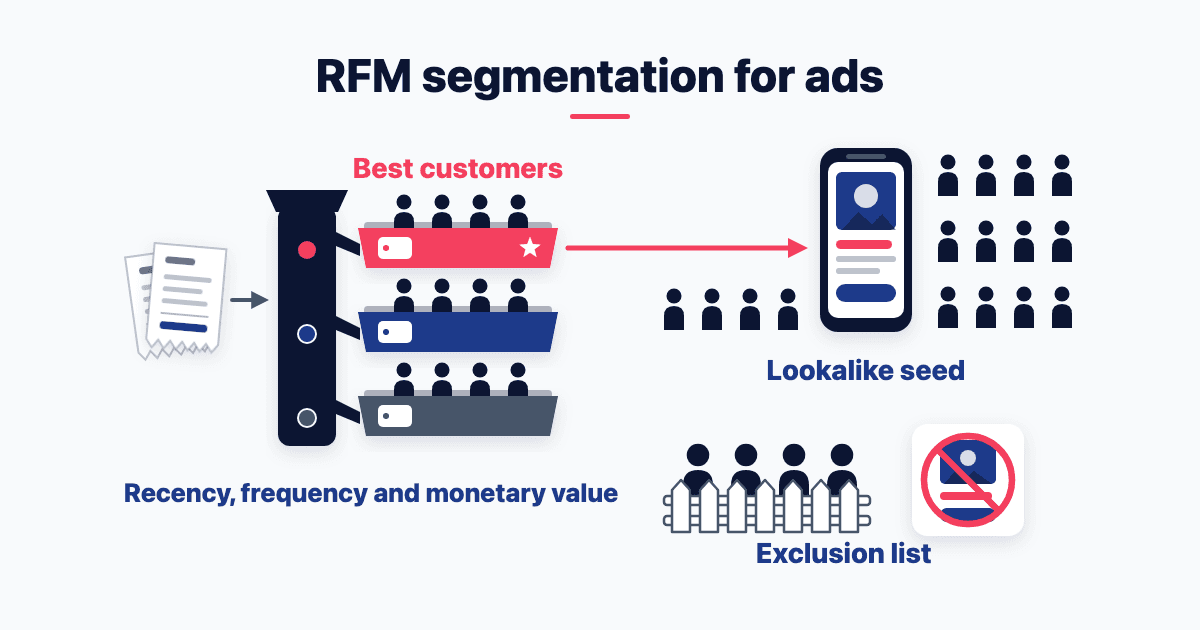
Your order history already knows who your next customers look like, and who you should stop paying to reach. RFM segmentation scores every customer on recency, frequency and monetary value, then turns those scores into named groups. Upload your best group as a lookalike seed, and your current buyers as an exclusion list.
That second list now does more work. With Meta's Advantage+ audience on, a lookalike is a suggestion the system can go beyond. Google's Demand Gen campaigns, which run ads on YouTube, Discover and Gmail (Google's Performance Max FAQ), are moving the same way. An exclusion is still a rule. Here's how to score, group and upload your customers.
What is RFM segmentation?
RFM segmentation ranks customers on three facts from their order history:
Recency: days since their last order.
Frequency: orders placed in your chosen window.
Monetary value: money spent in that window.
Each gets a score from 1 to 5, making a three-digit code; 555 is the top. Shopify's RFM analysis guide notes that "Three scores on a 1 to 5 scale create 125 possible combinations", which tools fold into named groups.
Why three numbers? One big order a year ago and five small orders this month may add up to the same spend. They need different ads.
On Shopify, the groups already exist: "Shopify's RFM customer analysis assigns 11 named groups". Ads need fewer, for a reason the platforms set.
How do you score R, F and M from an order export?
You need a spreadsheet, not code.
Export orders. Customer email, order date and order value, net of refunds and discounts.
Clean the file. Remove test, staff and fully refunded orders, and merge duplicate emails. Drop marketplace orders if you can't contact those buyers. After a sale season, sort festive buyers into groups first.
Pick a window that fits your buying cycle. Shopify suggests one that captures repeat purchases, "such as the past 12 months". Go longer for once-a-year purchases.
Summarise each customer. Last order date, order count and net total. Use margin instead of revenue if you have it.
Score each measure 1 to 5. Split R and M into five roughly equal groups (quintiles). Recency runs backwards: the most recent buyers score 5. Score F in fixed bands instead: 1, 2, 3, 4, and 5 or more orders. Frequency quintiles break when many customers have just one order. Shopify's rule: "Keep tied values together."
Write the analysis date at the top. Recency counts back from it.
A worked example, illustrative and not client data: last order 20 days ago, 4 orders, $310 in 12 months. In this store's quintiles, that's R 5, F 4 and M 4: code 544.
Which five or six segments do you need for ads?
Keep a segment only if it maps to one ad action and clears the platform's minimum size.
On Meta, "Origin audiences must have at least 100 members" (Meta's lookalike audience documentation). A Google lifecycle-goal list needs "at least 100 active members in at least one network" (Google's customer list requirements). Expect lists to shrink after upload, because not every email matches an account. So keep five or six segments, not 11.
At OurBus, which runs scheduled coaches on the US East Coast, my work included "RFM segmentation of every rider". That meant "Six segments, a suppression list and two lookalike seeds from the full transaction base, fed back into targeting."
Here's my starting map. Give each customer the first rule they match, so everyone lands in exactly one list:
Do not target. Opted out, open refunds or chargebacks, staff, test accounts, and anyone under the platform's minimum age. Exclude everywhere.
Best. R 4–5, F and M average 4 or more. Your lookalike seed; exclude from prospecting.
At risk. R 1–2, F and M average 3 or more: good customers going quiet. Win them back.
Loyal. R 3–5, F 3 or more. Exclude from prospecting; use your own channels.
New. R 3–5, one or two orders. Exclude from prospecting; earn the next order yourself.
Lapsed. R 1–2, F and M average under 3. A cheap win-back test, or leave them alone.
The thresholds are my working rules, not a standard. They borrow Shopify's approach, which "combines R with the average of F and M, rounded down".
Take a store with 8,000 buyers in 12 months (an example, not client data). It might split into Do not target 520, Best 480, At risk 900, Loyal 1,100, New 2,300 and Lapsed 2,700.
Before you bid for lookalikes, work out how much a new customer can cost you, counting repeat orders, not just the first sale.
Why does the exclusion list matter more than the seed now?
Because the platforms now treat one as a hint and the other as a rule.
Meta's Advantage+ audience can "expand the eligible audience pool the delivery system can search, subject to your non-negotiable constraints". Meta's Advantage+ audience documentation lists them: "location constraints, minimum age, language, and custom audience exclusions." Lookalikes aren't on that list.
Google Ads "is transitioning Lookalike segments to a suggestion mode for Demand Gen campaigns through a phased approach throughout 2026" (Google's lookalike segments help page). The reach slider "will no longer function as a targeting constraint".
So why build a seed at all? It still tells the machine who to look for first. But of the lists you upload, only the exclusion is an instruction it can't overrule. Build that first.
How do you seed a lookalike from your best customers?
On Meta, upload the Best group as a customer list and build a lookalike from it. Meta's lookalike documentation says the "ratio should be from 1%-20%" of the country. Meta "refreshes members in a lookalike every 3 days if the lookalike belongs to an ad set". But your seed is only as fresh as your last upload.
The seed gate I teach (free Google sign-in) is far stricter than Meta's floor: "The seed gate is last 180 days, ~1,000+ buyers for a sharp lookalike; below ~500, don't build one — seed the broad set." That's my rule of thumb from a 27 September 2026 session, not Meta's.
So the seed is everyone who bought in the last 180 days, minus Do not target. If Best alone clears about 1,000, use just Best. The example store has, say, 4,000 of those buyers, but only 480 in Best. Upload all 4,000, each with their net spend as a value, and build a value-based lookalike.
Meta "uses the value to determine which users in an audience are worth the most to you" (Meta's value-based lookalike guide). The seed stays big, but leans towards your best customers. That's my suggestion to test, not a platform rule.
Under about 500 recent buyers, don't build a lookalike. Run one broad ad set with Advantage+ audience on. Suggest the biggest audience your Meta Pixel records for an intent action, such as people who clicked your call-to-action button. Exclude your recent buyers. That's what "seed the broad set" means in my session sheet.
Some of those clickers may have bought already. Where the two lists overlap, the exclusion wins: Meta doesn't expand past it. Once your recent buyers clear the gate, graduate to the buyer seed above.
On Google, a Customer Match list can seed Demand Gen lookalikes (Google's lookalike targeting page). In Search, Performance Max and Shopping, the High Value New Customer setting tries to "attract high value new customers similar to your most valuable existing customers" (customer lifecycle goals). Google's help pages and its Ads API guide to lookalikes disagree on the minimum seed size, so I won't quote one.
How do you stop paying to reach customers you already have?
Build one suppression list for prospecting: Do not target, Best, Loyal and New, or 4,400 people in the example store. At risk and Lapsed stay off it: they're your win-back audiences.
On Meta:
Exclude the list in every prospecting ad set. Advantage+ audience won't expand past it.
Use the uploaded list, not just a pixel audience. Website custom audiences keep people for "Between 1 and 180 days" (Meta's website custom audience docs). Older buyers drop out.
Don't count on the old budget cap. The existing-customer budget cap "is not available for new Advantage+ campaigns" (Meta's Advantage+ campaign docs).
On Google:
Every compliant account can exclude. "All policy-compliant advertisers can use Customer Match" for exclusions (Google's Customer Match policy). Targeting has higher bars; see the FAQ.
Add your list to Google's. Google's own buyer list, from "up to the last 540 days of campaign activity and tracked purchases", is used "for exclusion in customer acquisition campaigns". Google still recommends adding Customer Match lists (Google's customer list setup).
The third use is win-back: upload At risk as its own list. In Performance Max, High Value Re-engagement goes after lapsed customers whose value came "from a high frequency of purchases, large basket size, or high value orders" (customer lifecycle goals). That's RFM in Google's own words. On Meta, use At risk in a retargeting ad set.
Expect one number to look worse. Meta warns that a lower cap on spend for existing customers "may lead to higher costs per conversion" (Meta's Advantage+ shopping campaign docs). Some of that rise may be bookkeeping: the platform stops claiming sales from people who were coming back anyway. Some may be real. The dashboard can't tell you which.
What consent do you need before you upload a customer list?
Both platforms put the burden on you. Meta's Customer List Custom Audiences terms make you "represent and warrant" that you have "all necessary rights and permissions and a lawful basis". If someone opts out later, "you will remove them from the audience". Contact details are "hashed before you upload", but hashing isn't consent.
Google's Customer Match policy allows only "customer information that you collected in the first-party context", so bought or scraped lists are out. You must also "Obtain consent for such sharing where required by law", or by Google's policies, including its EU User Consent Policy.
For India's Digital Personal Data Protection Act, use my consent checklist for marketers. This is not legal advice; check the rules in each country you sell to.
How often should you rebuild the lists, and how do you know it worked?
Re-score monthly and after any big sale, with the same rules each time.
Replace a list's members rather than deleting and re-adding them. Meta's replace call "does not reset your ad set's learning phase" (Meta's custom audiences guide). If an app syncs your lists, ask which method it uses. On Google, "Customer Match memberships expire after 540 days". A list stays eligible only if "at least 100 members are added or updated within that window" (About Customer Match).
Then prove it, and not with the platform's return on ad spend. Run a holdout on the win-back audience or the exclusion, and count total orders in your own system.
Seven steps from order export to live lists
Export 12 months of orders, net of refunds and discounts.
Clean out test, staff and refunded orders, and merge duplicates.
Score R and M by quintile and F by fixed bands, from a written date.
Assign the six groups, top to bottom.
Exclude the suppression list from prospecting on Meta and Google.
Seed from 180-day buyers: Best if it clears about 1,000, otherwise all of them with a value. Under about 500, no lookalike: suggest your biggest Pixel intent audience instead.
Set a monthly re-score date, and start one holdout.
Wiring the lists into both platforms, and keeping them fresh, is performance marketing work I do for clients.
If your order export is ready and you'd like the lists checked before they reach Meta and Google, book a call.
Frequently asked questions
What's the difference between RFM and customer lifetime value?
RFM ranks customers by what they've already done; lifetime value estimates their worth over the whole relationship. Shopify's RFM guide puts it simply: "RFM helps identify campaign audiences, and CLV informs how much you can afford to spend to acquire or retain them." Use RFM for the lists, and lifetime value to set what a customer may cost.
Do you need Python for RFM segmentation?
No. A spreadsheet handles a store's order export, using the scoring steps above. On Shopify you can skip the scoring: "open the RFM customer analysis report under Analytics > Reports, select a group, and click Preview segment" (Shopify's guide). Code earns its place when the file outgrows a sheet, or when you want lists rebuilt and uploaded automatically.
What are the requirements for a Google Ads customer list?
Use first-party data only, from an account with "a good history of policy compliance and good payment history" (Google's Customer Match policy). Every such account gets exclusions and observation. Targeting needs "90 days of Google Ads history and more than USD $50,000 total lifetime spend". Members expire after 540 days; refresh at least 100 in that window.
What is a good RFM score?
There's no universal good score, because RFM scores rank customers within your own base. The top code is 555. Shopify's example says that if each measure earns a 5, "their RFM code is 555". Instead of chasing a score, watch the share of customers in Best and At risk each month. A growing At risk group is your early warning.
- Customer segmentation
- Paid ads
- RFM
Written by Siddhesh Joglekar
Fractional CMO and AI marketing consultant Siddhesh Joglekar helps founders and growth-stage teams build marketing engines that compound.