AI
n8n for marketing teams in India: the first five workflows worth automating, and where a human signs off
n8n for marketing in India: the first five workflows to build, what each connects, where a person signs off, and what n8n costs to run.

· 10 min read
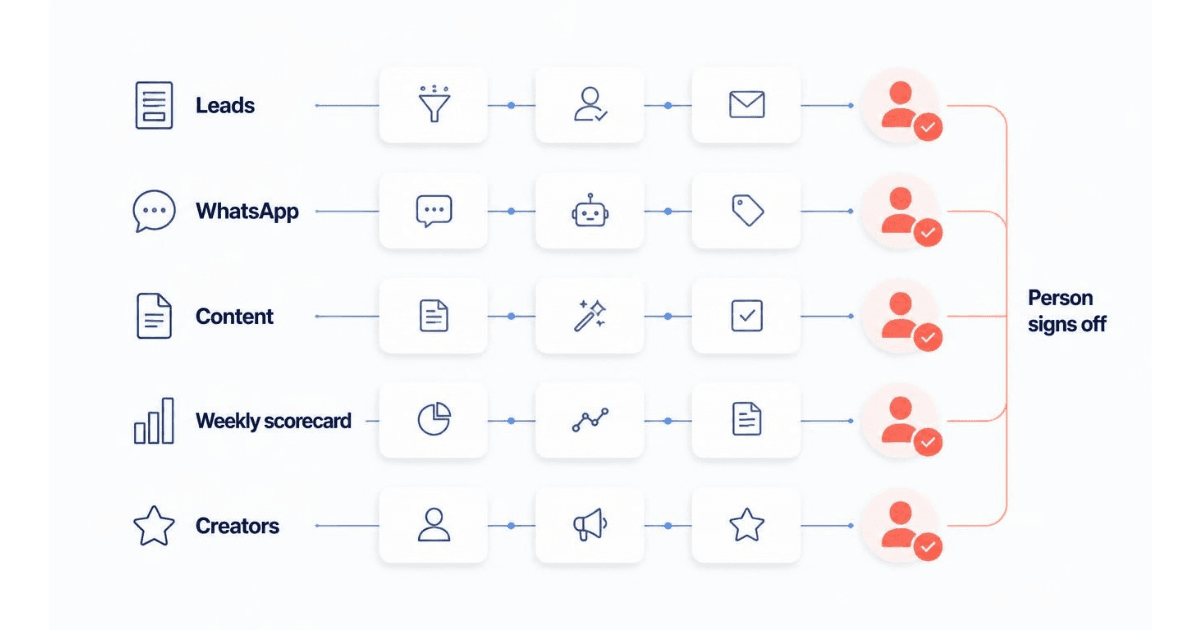
n8n for marketing pays off when you automate the work that moves data and drafts, and keep a person on the decisions. For most Indian marketing teams, five workflows come first: leads, WhatsApp enquiries, content drafts, a Monday scorecard and a creator shortlist. Each has a named person who signs off wherever the brand speaks to a customer, spends money or drops a lead.
Below, for each workflow: what starts it, what it connects and exactly where a person signs off. No code.
What is n8n for marketing, and when is it the right tool?
n8n is a workflow automation tool. A workflow starts from a trigger (a new lead, a WhatsApp message, a set time) and passes data through steps that connect your apps and AI models.
n8n marketing automation is priced by the run, not the seat. n8n's pricing page defines an execution as "a single run of your entire workflow", however many steps it has, and every plan includes "unlimited users & workflows and every integration".
The self-hosted Community Edition is free under n8n's Sustainable Use License, which n8n's licence page calls "fair-code" and "source-available", not open source.
It is the right tool when a job crosses three or more tools, needs an AI step that pauses for approval, or when you want to choose where data sits. If every step lives inside your customer relationship management (CRM) system, you may not need it.
How do you pick the first workflows?
Most lists of n8n use cases for marketing start from what is possible; n8n's template gallery holds thousands of n8n templates for marketing. Start instead from your team's weekly work, and apply four tests.
The team already does it by hand every week, so you know what good output looks like.
It moves data or drafts, not decisions. Filing a lead is safe to automate; calling it junk is not.
You can name who signs off, and at which step. If nobody owns the approval, nobody owns the mistake.
You would know within a day if it broke. An error workflow can send email or Slack alerts to that person when a run fails.
A person always signs off on new words to customers (a template, a broadcast, a public post), on money (bids, budgets, discounts) and on dropping a lead or a creator.
The exception is an opt-out. It runs automatically, at once, in every tool, never behind an approval. The DPDP consent checklist for marketers explains why.
How the pause works. Built-in steps hold a run until someone clicks Approve: n8n's Gmail step, its WhatsApp step and its approval before an AI agent uses a tool. A declined run is not a failure: the build sheet from my IIM Calcutta DigiAIM session calls it "the success state of a working gate".
The first five n8n workflows for marketing teams in India
Each uses the same four labels, so you can hand it to whoever builds it.
1. Every new lead into one clean record, with a fast alert to sales
Every lead is de-duplicated, filed in the CRM and sent to a salesperson at once.
Trigger: a new lead from Meta lead ads, a Google Ads lead form or your website. Google Ads can send each lead to a webhook (the address a form sends new leads to) "immediately after a form is submitted" (Google Ads Help).
Connects: a duplicate check on phone and email, the CRM (n8n's Zoho CRM step creates or updates the lead), and a WhatsApp or Slack alert to the rep naming the campaign. Keep the consent tick with the lead.
Person signs off: the sales rep, in the CRM after the call. Only the rep marks a lead unqualified; an AI score may sort the queue, never drop a lead.
Watch out: Meta allows one webhook per app, so switching to a test address overwrites the live one (n8n's Facebook Lead Ads trigger docs). Test outside campaign hours.
In practice, DocTutorials' operations layer pairs "n8n workflows, CRM AI and LLM content pipelines" with "lead qualification and predictive scoring so sales time goes to the students most likely to enrol".
2. WhatsApp enquiries: a fast first reply, then a person
n8n WhatsApp automation works best on inbound enquiries: answer common questions at once, log the chat, hand the rest to a person.
Trigger: a new WhatsApp message, for example from a Click-to-WhatsApp ad.
Connects: Meta's Cloud API directly, or a Meta Solution Partner providing "messaging services, billing, integration support, and customer support" (Meta's Solution Partner overview); if a provider already holds your number, connect n8n to it. Then an AI step answering only from an approved answer sheet (fees, batch dates, timings), a CRM note and a handover.
Person signs off: the marketing head, on every new message template before it goes to Meta. Anything off the answer sheet (complaints, refunds) goes straight to an agent.
Watch out: free-form replies work only inside the 24-hour customer service window; after it, "you can only send pre-approved template messages" (Meta's WhatsApp documentation). Opt-outs run automatically. WhatsApp also allows only one webhook per app: the same testing trap.
For what each message costs, see how WhatsApp per-message pricing works for Indian brands.
3. Content drafts that wait for your approval
An AI step drafts posts from your content calendar, and a person approves each one before it goes anywhere.
Trigger: a new row in a content-calendar Google Sheet. In the DigiAIM session sheet, the trigger checks the queue "hourly; a new row starts a run", and "the agent never picks its own topics".
Connects: the sheet, then an AI step carrying your brand-voice rules, then an email with Approve and Decline buttons, then approved posts into an output sheet.
Person signs off: the content owner, at the email step. The sheet's note on it: "Never delete this node."
Watch out: don't let it publish on its own at first. The sheet swaps the output sheet for a real publishing step only "after two clean weeks".
4. A Monday scorecard that only reads your ad accounts
Every Monday it turns last week's numbers into one short note.
Trigger: a weekly schedule, with the workflow's timezone set to India. Self-hosted n8n defaults to "America/New York"; n8n Cloud falls back to GMT if it can't detect yours (n8n's Schedule Trigger docs).
Connects: Google Ads, Meta, Google Analytics and the CRM, then cost per lead and per sale by channel in rupees, then a short AI note on what needs attention, by email or Slack to the marketing head.
Person signs off: the marketing head decides what changes after reading the note; a person makes bid and budget changes in the ad platform. n8n's Google Ads step only reads campaigns; keep every connection read-only.
Watch out: check two or three numbers against the ad platform before the scorecard reaches the CEO.
OurBus, a US intercity coach operator, uses this rhythm: "Three flag signals every Monday, a Friday deep dive on anything flagged, and a correction for conversion data that matures over two weeks."
5. A creator shortlist with drafted outreach
Each day it scores likely creators and drafts a first message, for a person to review.
Trigger: a daily schedule.
Connects: creator profiles you are allowed to use (a platform export or your research sheet), then an AI fit score against your brief, a never-pitch check and draft messages in a review sheet.
Person signs off: the influencer manager, in the review sheet, approves the shortlist, then sends each message from the brand's own account. The workflow never messages creators.
Watch out: creators' contact details are personal data, so they go on the same consent checklist as your leads.
DocTutorials' influencer engine has this shape: "Daily automated discovery of nano and micro medical-education creators, scored for trend and exam fit, with a ready-to-send message for each and a never-pitch roster of competitor-affiliated accounts."
What does n8n cost, and where should it run?
List prices on n8n's pricing page, checked 30 September 2026, in euros and billed annually (monthly costs more):
Starter: €20 a month, 2,500 executions.
Pro: €50 a month, 10,000 executions.
Business: €667 a month, 40,000 executions, "currently only available for self-hosted n8n". Firms under 20 employees may qualify for "50% off Business".
Community Edition: free, self-hosted.
An illustration: one lead is one run of workflow 1, so 60 leads a day is about 1,800 runs a month, most of Starter's 2,500. Measure in n8n's free trial: 14 days of Pro features, capped at 1,000 executions. If you don't upgrade by the end, n8n deletes the workspace; you get 90 days to download your workflows.
On top, budget for AI model usage, WhatsApp message charges and the owner's time.
Where it runs:
n8n Cloud: data is stored "on servers located in Frankfurt, Germany" (n8n's pricing page).
Self-hosted: wherever you choose, such as Amazon Web Services' Mumbai or Hyderabad regions.
WhatsApp: Meta offers local storage of message data at rest, with India among supported regions as of 30 September 2026. Content "may be stored on Meta data centers internationally while being processed", for up to 60 minutes.
For the legal side, see whether your marketing data has to stay in India.
The licence. n8n's licence FAQ lets you "Use n8n community version to help run your business". An agency may build client workflows on its own instance "as long as your clients do not have the possibility to create or edit them". This is not legal advice.
If you would rather have the first workflows set up and handed to your team, that is the marketing automation work I do.
Isn't your CRM's own automation, or Zapier, enough?
Sometimes. If every step lives inside one tool, use its own automation. Zapier's post on n8n for marketing, whose author says they work at Zapier, warns that "n8n also assumes you're comfortable with APIs, authentication, and troubleshooting when something changes under you."
Fair, and for jobs inside one tool, decisive. Across several tools, n8n earns its place if one named owner can read a failed run. That owner can be a marketer. The DigiAIM sheet tells first-time builders: "Red credential boxes after import are NORMAL, not broken. Every fix is a click, not code."
What to do in the next 30 days
List five weekly manual jobs. Apply the four tests; pick two.
Write down who signs off on each, at which step, in which channel.
Build in the 14-day trial, testing on a test form or number, never a live campaign.
Add an error workflow that alerts a named owner.
After two clean weeks, choose a plan and hosting, and download every workflow.
If you want the first two or three built on your stack, with the sign-offs written down and handed to your team, book a call.
Frequently asked questions
Can n8n run our email marketing?
Use it alongside your email platform, not instead of it. n8n's Mailchimp step, for example, can add or update a subscriber, tag them and send a campaign. Keep templates and delivery in the email platform. Use n8n to feed it consented contacts from your forms, ads and CRM, and to copy every unsubscribe to your other tools at once.
What do we need before n8n can run our WhatsApp chatbot?
Three Meta assets, if n8n connects to WhatsApp directly. n8n's WhatsApp credentials guide lists a Meta developer account, a business portfolio (formerly Business Manager) and a business app set up with WhatsApp. The app needs privacy policy and terms of service links, and must be switched to Live. Fully verifying and launching it "will take further configuration", so start early.
If an agency builds our n8n workflows, who should own them?
Your company should. Keep the n8n account and every app login (Meta, Google Ads, the CRM) in your company's name, and let the agency build inside it. n8n saves each workflow as a JSON file you can download, so ask for every file at handover. Ask, too, for the written list of who signs off at which step.
Is there an n8n course for marketers?
Start with n8n's own course, which teaches the tool in general rather than for marketing. n8n Academy's "Essentials: Your First Workflows" is free to register for, and most learners finish it in 2 to 4 hours. It needs a working n8n instance, so take it inside n8n's 14-day trial and practise on one of the five workflows above.
- n8n
- Marketing automation
- Workflows
Written by Siddhesh Joglekar
Fractional CMO and AI marketing consultant Siddhesh Joglekar helps founders and growth-stage teams build marketing engines that compound.